If you are new to the oilfield, or you have been around a while and still find yourself squinting at a lease map before a run, DLS coordinates can feel harder than they really are. They are the standard way to describe wellsite locations across Western Canada, and once you know how to read them, getting to the right gate becomes a lot more straightforward.
This guide breaks down how a DLS location works, what each part means, and how to use that information to navigate to the physical surface location you actually need to reach.
What the DLS system is
DLS stands for Dominion Land Survey. It is a grid-based land measurement system used across Alberta, Saskatchewan, Manitoba, and parts of British Columbia to divide land into consistent blocks. Instead of relying on latitude and longitude, the DLS system organizes land into meridians, ranges, townships, sections, and legal subdivisions.
In practice, that gives every wellsite in Western Canada a unique land description. Once you can read that description, you can understand where the location sits on the grid before you ever leave the yard.
How to read a DLS location
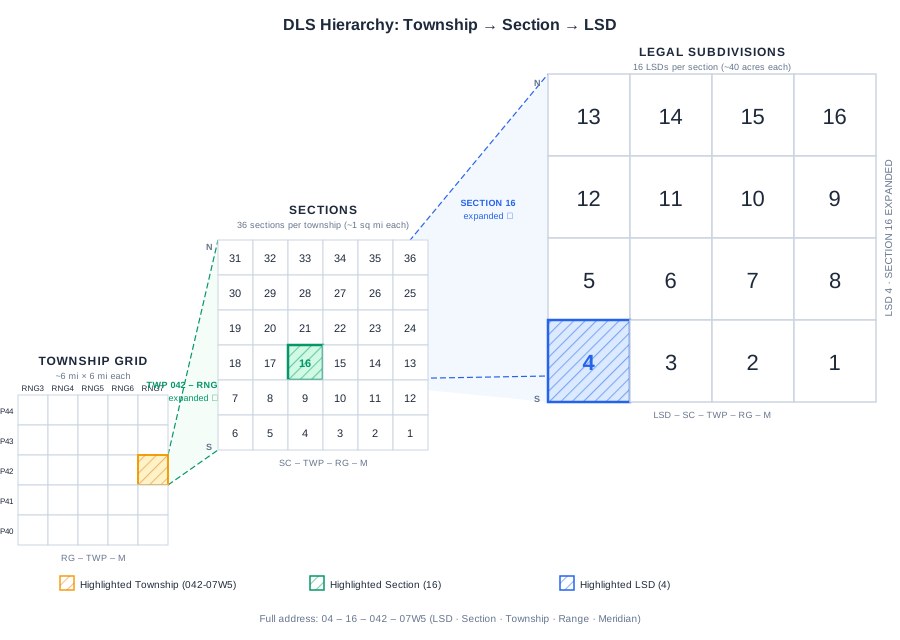
A typical DLS wellsite location looks like this: 04-16-042-07W5.
It is easiest to read a DLS location from right to left because that is how you build the big-picture position first and then narrow down to the exact block.
Meridian: the starting point
The last part of the address identifies the meridian. This tells you which principal survey line the location is measured from and gives you the broad regional anchor for the location.
- W1: eastern Saskatchewan and the Manitoba border area
- W2: central Saskatchewan
- W3: west-central Saskatchewan
- W4: the Alberta and Saskatchewan border area
- W5: central Alberta
- W6: northwest Alberta and northeast British Columbia
Saskatchewan work is commonly tied to W2 and W3. Alberta work is typically tied to W4 and W5. Northeast British Columbia oilfield activity usually falls under W6.
Range: east-west position
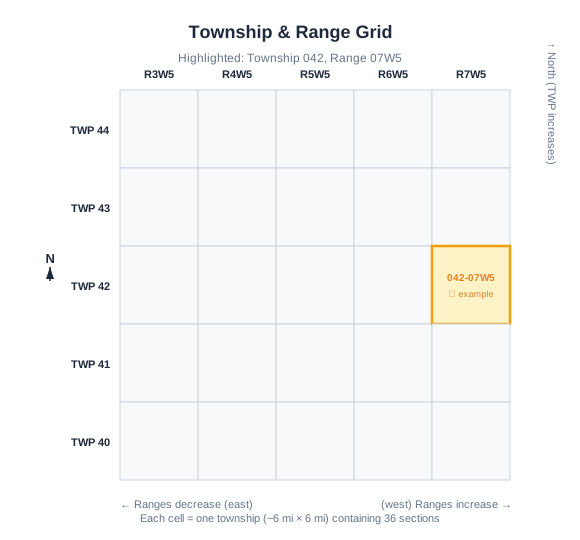
The range tells you how many ranges east or west of the meridian the location sits. In 07W5, the location is in Range 7 west of the 5th Meridian. Range lines run vertically and are approximately 6 miles apart.
Township: north-south position
Townships are numbered north from the United States border. In the example above, 042 means Township 42. Each township is approximately 6 miles by 6 miles and contains 36 sections.
Section: the square mile
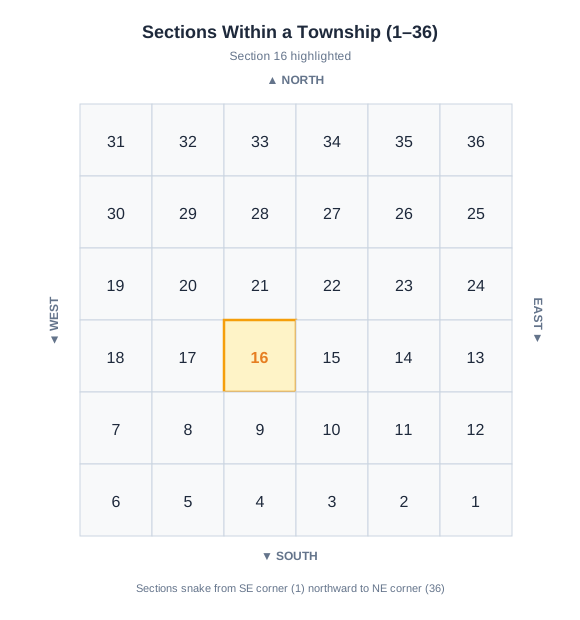
Each township is divided into 36 sections, and each section is about 1 square mile or 640 acres. In the example, 16 is the section number.
LSD: the most specific block
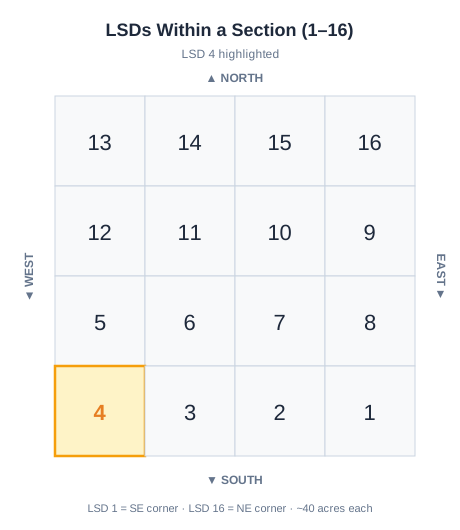
LSD stands for Legal Subdivision. Each section is divided into 16 LSDs numbered 1 through 16 in a standard back-and-forth pattern. In the example, 04 means LSD 4, which narrows the destination to roughly a 40-acre block within that section.
Putting it all together
Once you stack those pieces in order, the full DLS address becomes much easier to read. The meridian and range place you in the right part of the province, the township narrows the north-south position, the section gets you to the square mile, and the LSD gets you to the final block.
UWI versus surface location
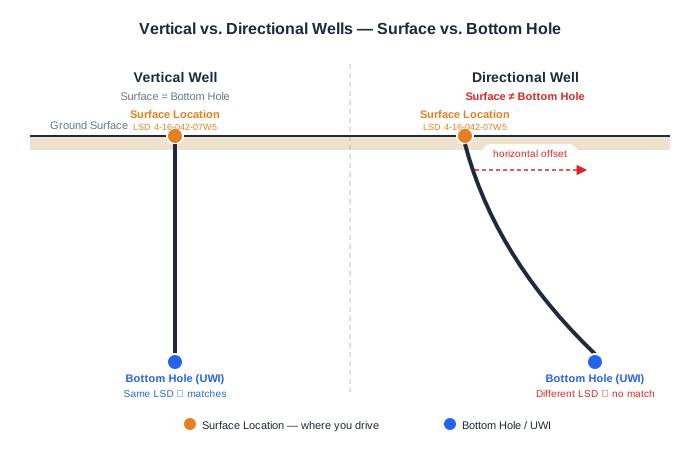
One of the most common field mistakes is assuming the UWI always points to the place you need to drive. It does not.
The UWI, or Unique Well Identifier, commonly identifies the bottom hole location. The surface location is where the rig sat, where the access road and gate are, and where the wellhead is located. For a vertical well, the two points are effectively the same. For directional or horizontal wells, they can be materially different.
That matters in the field because a work order may give you a UWI such as 100/04-22-042-07W5/00 while the physical surface lease you need to reach is in a different LSD. If you route to the wrong point, you can end up near the bottom hole description instead of the actual lease entrance.
Oilfield Route helps handle that difference directly. You can search by DLS, UWI, or other well identifiers, then review the surface location shown in the well details before starting the trip so you know you are routing to the place you can physically access.
How to navigate to the wellsite
Once you understand the land description, the practical field workflow is straightforward. With Oilfield Route, you can use powerful DLS coordinate or UWI search to find the location, confirm the right surface point, and drive to it with routing built for oilfield roads.
Step 1: Confirm the full DLS before you leave
Make sure you have the complete DLS location from dispatch, a work order, or the customer. A location such as 06-22-039-05W5 is only useful if every part of the string is present and accurate. Write it down, save it in your notes, or screenshot it before heading out.
Step 2: Use a routing tool that understands DLS
Consumer navigation apps are built for street addresses and public roads. They are not built for quarter sections, lease roads, or oilfield search workflows. Oilfield Route lets you search by DLS, UWI, or well identifiers, review matching wells, confirm the surface location, and generate a route using the roads that matter in the field.
That is the difference between getting close and getting to the right lease.
Install it now and keep routing when the signal drops
Choose your device, download the regional map package for your operating area, and head out with offline routing ready before you lose coverage.
Step 3: Prepare for no-signal conditions
Grid roads and lease roads often have weak or nonexistent cell coverage. If you use Oilfield Route Pro, download the province or region you work in before heading out. Once the maps are on the device, you can search and route offline without depending on a live connection.
That is not just a convenience feature. It reduces the chance of losing navigation support at the exact point where road conditions, turnaround options, and time pressure all start working against you.
The bottom line
DLS coordinates are not complicated once you know the order: LSD, Section, Township, Range, and Meridian. Read the land description properly, use a routing tool built for oilfield destinations, and you have a much better chance of arriving at the correct gate on the first try.
If you want turn-by-turn directions from a DLS address instead of translating the location manually, Oilfield Route is built for exactly that workflow. You can install the app, search the well, confirm the surface location, and head out with the route ready before you lose signal.
If you need help confirming a location or coverage area, use the contact page and the team can help you verify the workflow before your next run.